expense-approval.md
# Expense Approval
 
1. Receive expense submission via webhook
 
2. AI reviews against company spending policy
 
3. If over $500, route to manager for approval
 
4. Post approved expense to accounting system
Compiled execution plan
✓ Receive
→
✓ AI Check
→
✓ Approve
✓ Manager
→
✗ Post API
Error403 Forbidden — accounting API token expired
AI RecoveryDiagnosed: expired OAuth token. Refreshing and retrying with valid credentials.
✓ Receive
→
✓ AI Check
→
✓ Approve
✓ Manager
→
✓ Post API ⚡ ADAPTED
→
✓ Notify

Automate anything you can describe.
Write it. AI plans it. CFFBRW runs it.

No code requiredSelf-healing runsHuman approval gatesAPI + AI + tools built inRuns on Cloudflare edgeBring your own AI

Real workflows. Running today.

From expense approvals to weekly reports — if you can describe it, CFFBRW can run it.

Three steps. Your workflow is live.

Write what you want done, let AI plan it, CFFBRW runs it. No YAML, no drag-and-drop, no infrastructure to manage.

Step 01Write in markdownAuthor workflow steps as markdown headings. Describe what each step should do and how steps relate — "parallel with step 3", "depends on steps 2 AND 3". A non-technical ops person can author a workflow.
→
Step 02Your AI compiles the planYour AI reads your prose and generates the execution plan. It has your full project context — files, tools, patterns. CFFBRW validates and stores the plan.
→
Step 03CFFBRW executes + healsCFFBRW runs the plan on Cloudflare's edge. Parallel steps, conditional branches, live streaming. When steps fail, CFFBRW's AI diagnoses and fixes them automatically — you see "Adapted," not "Failed."

Describe what should happen.
AI figures out the order.

Write "runs in parallel with step 3" and the compiler gives both steps the same dependency. Write "depends on steps 2 AND 3" and it wires a fan-in. You describe relationships in English — the execution graph is automatic.
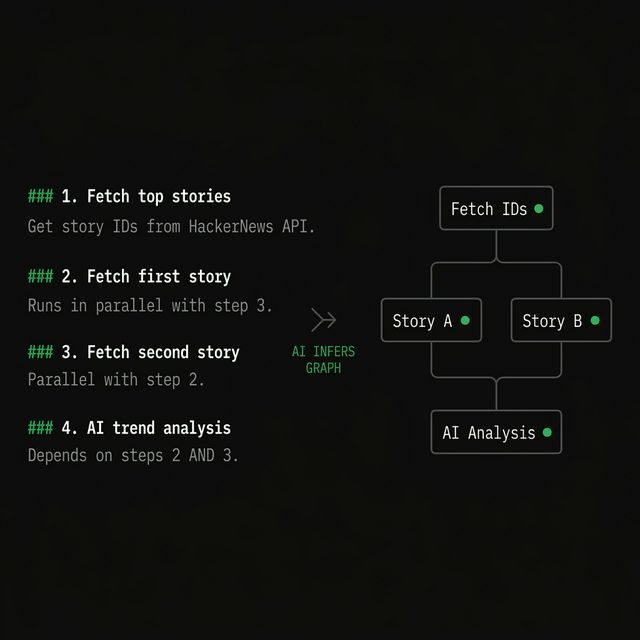
"step 1" → runs first (sequential)
"parallel with step 2" → runs at the same time
"depends on 2 AND 3" → waits for both (fan-in)
"if score > 100" → conditional branch
Markdown steps transformed into a directed acyclic graph by the AI compiler

When something breaks,
it fixes itself.

API changed its response shape? Wrong format returned? AI recovery diagnoses the error, sees prior outputs, and either corrects the result or retries with fixed parameters. You see "Adapted" — not "Failed." Up to 2 recovery attempts before escalation.
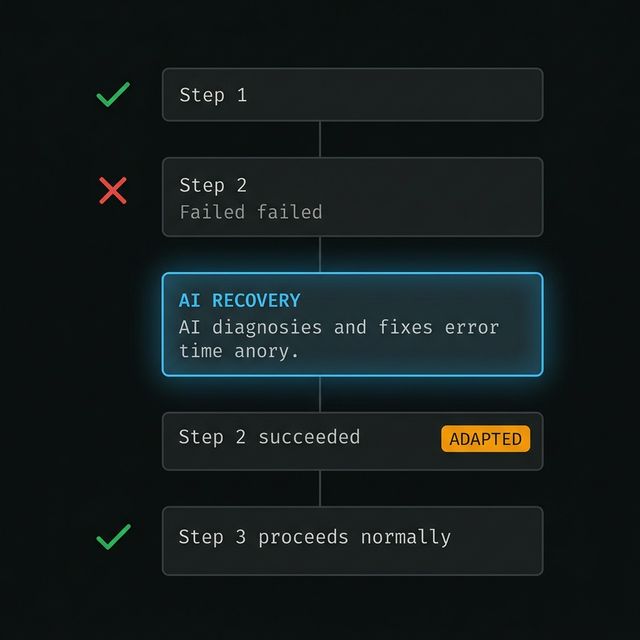
→ Correct the output directly
→ Retry with adjusted parameters
→ Generate a code fix (with your approval)
→ Call a different tool to work around it
→ Escalate to a human after 2 attempts
Self-healing execution flow: failure, AI recovery diagnosis, adapted result

Runs globally.
Zero infrastructure to manage.

Every workflow runs in its own isolated instance with built-in state persistence, live streaming, and automatic hibernation. No containers to manage. No cold start lag. Plans are cached — same markdown always hits cache instantly.
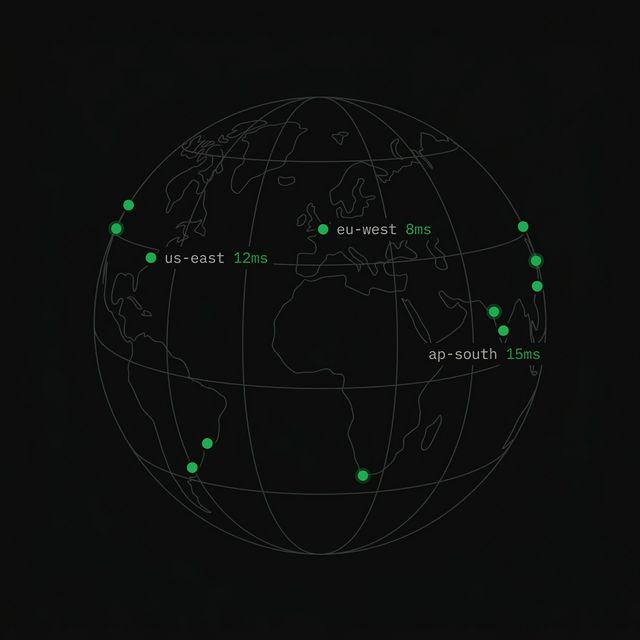
Isolated execution per workflow run
Live WebSocket streaming to your browser
Content-hash caching — no redundant compiles
Large outputs automatically stored in object storage
Global edge computing network with sub-millisecond latency at edge locations

Same workflow, instant re-runs.
Edit one word, it recompiles.

The execution plan is cached by content hash. Same markdown with the same tools always produces the same plan — instant cache hit, no AI call needed. Edit one word and it recompiles. Recompilation is always explicit, never accidental.
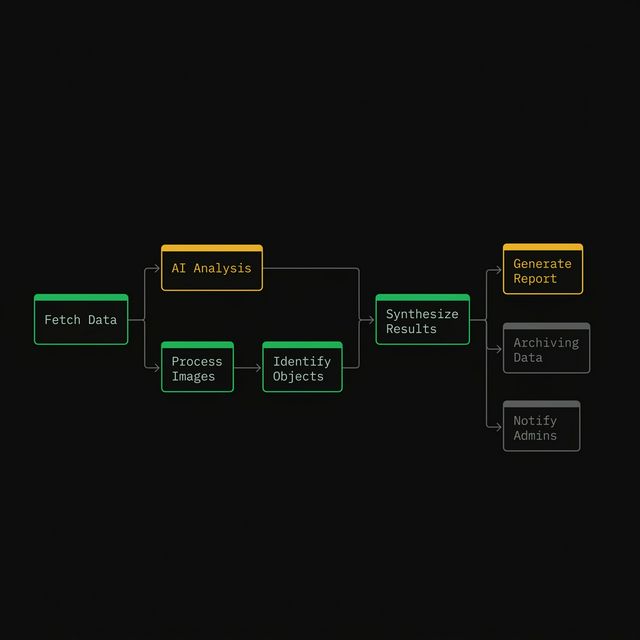
same markdown = same hash = cache hit (0ms)
edit markdown = new hash = fresh compile
click [Recompile] = bypass cache
Workflow execution DAG with parallel batches and status-colored nodes

Use your AI to build workflows.
Ours keeps them running.

Connect CFFBRW as an MCP server in your IDE or agent. Your AI compiles markdown into execution plans — with full project context and your preferred model. CFFBRW validates, deploys, and runs the plan. When steps fail at runtime, CFFBRW's own AI diagnoses and fixes them.

Your AI → compiles (your model, your context, your cost)
CFFBRW → validates (ensures plan is correct and complete)
CFFBRW → executes (parallel steps, live streaming, edge runtime)
CFFBRW → heals (diagnoses failures, retries with fixes)
Connect your AI to CFFBRWBYOA
Your AI compiles markdown into execution plans. CFFBRW validates, deploys, and runs them. One command to connect.
CLAUDE CODE
$claude mcp add --transport http cffbrw https://api.cffbrw.com/mcp
CURSOR / ANY MCP CLIENT
{ "url": "https://api.cffbrw.com/mcp" }
OAuth login opens automatically on first use. No API key needed.

HTTP, AI, code, approvals — all built in.

10 step types cover the vast majority of automation needs out of the box. And when you need something custom, Code Sandbox runs any JavaScript in an isolated Cloudflare Worker with network blocked. The possibilities are endless.

Code Sandbox stepisolated · network blocked · <10ms
1const users = data.step_0.results;
2const active = users.filter(u => u.lastSeen > Date.now() - 86400000);
3const grouped = Object.groupBy(active, u => u.plan);
4
5return {
6 total: active.length,
7 byPlan: Object.fromEntries(
8 Object.entries(grouped).map(([k, v]) => [k, v.length])
9 ),
10};
⚡Full JavaScript — loops, closures, array methods, object manipulation
🔒Fully isolated — no network, no filesystem, no ambient access
⏱Sub-10ms execution — spins up near-instantly
∞Any transformation the 10 built-in types can't express

Three tiers of execution.

Most steps run deterministically with no AI at runtime. When things break, AI recovery kicks in. When machines can't decide, humans take over. Each tier escalates only when needed.

T1
Deterministic execution
Step runs exactly as compiled. No AI involved at runtime. The plan is the source of truth — the engine follows it literally.
API calls, tool integrations, transforms, conditionals, code sandbox, loops, waits
T2
AI-in-the-loop recovery
Step fails → AI sees the error + prior outputs → diagnoses the issue → provides a fix (corrected output, modified params, or generated code). Maximum 2 attempts before escalation.
Can adjust: API calls, prompts, expressions, timeouts
Cannot change: step type, tool bindings, code (security boundary)
T3
Human-in-the-loop
Workflow pauses and waits for approval. The UI shows [Approve] and [Reject] buttons. Optional webhook push + signed email links with configurable TTL (default 24h, max 7 days). No auth needed for signed links.
Approve/reject buttons, secure email links, webhook notifications

For founders who automate. For agents that execute.

If you're chaining API calls and scripts today, CFFBRW replaces the glue with readable, version-controlled markdown. If you're building AI agents that need reliable multi-step execution with human gates, this is the runtime.

For developers
Replace your scripted automation with readable markdown workflows. Version them in git. Compile on push. Trigger via API, cron, or webhook. Every run is logged with step-level timing and recovery history.
For AI builders
Connect CFFBRW as an MCP server. Your agent compiles workflows, validates plans, triggers runs, and monitors execution — all via MCP tools. The agent writes markdown; CFFBRW handles the rest.
For ops teams
No YAML to learn. No node editor to master. Write steps in English, describe dependencies in prose, and let the AI figure out the graph. Human approval gates let you stay in the loop without blocking automation.
trigger via API
$ curl -X POST \
  https://api.cffbrw.com/v1/workflows/:id/run \
  -H "Authorization: Bearer $API_KEY" \
  -d '{"input": {"query": "latest trends"}}'
{ "runId": "run_8f3a...", "websocketUrl": "wss://..." }
cron schedule
trigger_type: "cron"
trigger_config: "0 9 * * MON"
// Runs every Monday at 9am UTC

Describe what you want done.
It runs.

Write your first markdown workflow and watch the AI compile it into a real execution plan in seconds. No credit card. No config files.